

https://api.dune.com/mcp/v1 over Streamable HTTP, so there is nothing to install. You sign in with your Dune account through OAuth 2.0; in headless and CI environments, you send a Dune API key in the x-dune-api-key header instead. With Dune MCP, any MCP-compatible AI client, such as Claude Code, Claude Desktop, Cursor, Codex, or OpenCode, can search Dune’s blockchain tables and docs, create and run DuneSQL queries, read query results, build visualizations and dashboards, manage materialized views, folders, and schedules, and submit contracts for decoding.
MCP (Model Context Protocol) is an open standard for connecting AI applications to external systems. Dune MCP gives your agent direct, structured access to Dune workflows, all in the same conversation.
This is the fastest way to move from prompt to reliable onchain analysis. See also Agents on dune.com.
Authentication
To connect, sign in with your Dune account. You do not need an API key. Most agents only need:Name: Duneurl:https://api.dune.com/mcp/v1
Connect Dune to your AI client
Every client uses the same server URL,https://api.dune.com/mcp/v1, and the same Dune sign-in. Pick your client below.
Connect Dune to Claude Code
Run this command in your terminal:/mcp in Claude Code and select dune to sign in.
Connect Dune to Claude Desktop
Add Dune as a custom connector:- In Claude, click the + (Add) icon in the chat box and select Manage connectors.
- In Connectors, click Add, then select Add custom connector.
- Enter
Duneas the name andhttps://api.dune.com/mcp/v1as the URL, then click Add. - Select the new Dune connector in the list and click Connect.
- Sign in to Dune in the browser window that opens, then select the team that the connector uses.
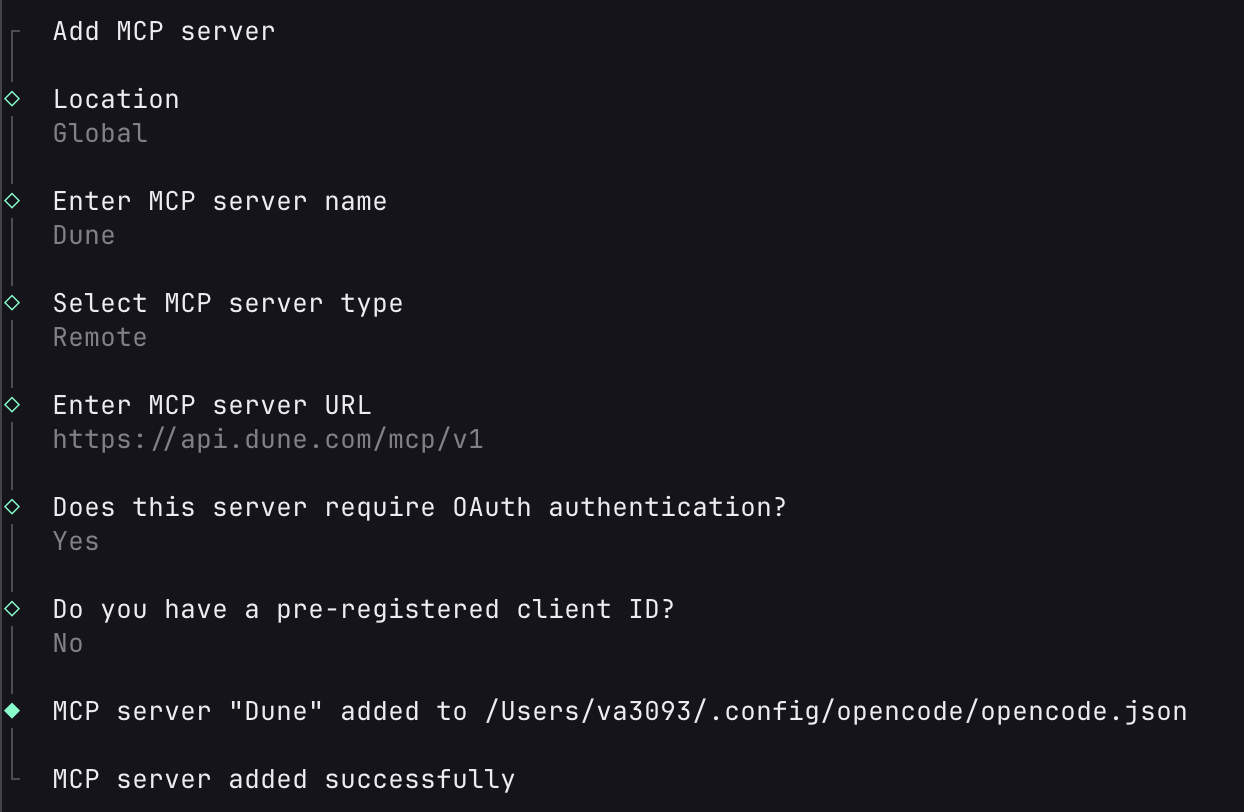
Connect Dune to OpenCode
-
Run
opencode mcp addand answer the prompts:OpenCode saves the server to~/.config/opencode/opencode.json. -
Run
opencode mcp auth Dune. OpenCode opens a browser window where you sign in to Dune.
Connect Dune to Codex
Run these commands in your terminal:Connect Dune to Cursor
- Open the command palette and select Cursor Settings.
- In the left sidebar, go to Tools & MCP.
-
Click Add Custom MCP. Cursor creates or opens your
mcp.jsonfile. -
Add this configuration and save the file:
- Sign in with your Dune account when Cursor asks.
Use Dune with ChatGPT
Dune MCP supports OAuth sign-in for ChatGPT, so you connect with your Dune account instead of an API key. Use the server URLhttps://api.dune.com/mcp/v1.
Other MCP clients
Any client that supports remote MCP servers over Streamable HTTP can connect. UseDune as the name and https://api.dune.com/mcp/v1 as the URL, then sign in with your Dune account. If the client cannot open a browser, see Headless and CI environments.
Headless and CI environments
Use this only when your agent runs where it cannot sign in with a browser, for example in CI. In all other cases, sign in with your Dune account as shown above. Send your Dune API key in thex-dune-api-key header. Do not put the key in the URL.
Tools and Resources Inventory
Tools
Dune MCP has 43 tools. The Access column comes from the annotations that the server sends with each tool:- Read: reads data and changes nothing.
- Write: creates content, moves it, or starts a query execution. Executions use credits.
- Destructive: can overwrite, archive, or delete existing content.
Resources
Charts in the conversation
In clients that support MCP Apps, such as Claude and ChatGPT,renderVisualization shows a Dune chart, counter, or table in the conversation. The view loads an existing visualization and the results of the execution that you give, or of the latest successful execution of the query. It only shows results that exist. It does not run, save, or change anything. If the query has no completed execution, the view shows an error.
In clients that do not support MCP Apps, use the links that generateVisualization, getVisualization, and updateVisualization return: interactiveChartUrl opens the chart on dune.com, and chartJpegUrl is a static image of it.
In Claude, add the server with exactly https://api.dune.com/mcp/v1, with no trailing slash. Claude ties the chart view to the server URL that you entered, so the chart does not load if the URL is different.
Server Details
- Server name:
dune - Remote MCP URL:
https://api.dune.com/mcp/v1 - Tagline: Query, analyze, and visualize onchain data from Dune directly inside your MCP-compatible AI client.
- Primary use cases:
- Discover datasets and docs relevant to a protocol, contract, or chain
- Create, update, execute, and troubleshoot Dune SQL queries
- Turn query results into charts/tables/counters without leaving your chat
- Create and manage full dashboards from natural language prompts
- Materialize query results into reusable tables and keep them fresh on a schedule
- Submit contracts for decoding and track the status of the submissions
- Track account credit usage while iterating on analysis
Prompt Examples
Try prompts like these in your MCP-enabled client:- “Find the best Dune table for tracking Uniswap v3 swap volume on Ethereum, then create and run a daily volume query for the last 90 days.”
- “I have contract
0xa0b86991c6218b36c1d19d4a2e9eb0ce3606eb48. Find decoded tables, build a weekly transfer count query, execute it, and show the top 20 recipient wallets.” - “Review query
1234567, optimize it for lower scan cost, update it in place, run it, and summarize result quality and execution credits used.” - “Generate a visualization from my latest execution results: a line chart of daily active addresses and a counter for total unique users.”
- “Create a dashboard showing Ethereum activity in the past 30 days — include daily transactions, active addresses, and gas usage.”
- “Update my existing dashboard to add a new chart showing weekly DEX volume by protocol.”
- “Materialize my daily active addresses query into a table and refresh it every hour, then list my materialized views to confirm.”
Connection Details
Transport
- Protocol: Remote MCP over Streamable HTTP
- Endpoint:
https://api.dune.com/mcp/v1 - Interaction pattern:
POST /mcp/v1for MCP requestsGET /mcp/v1for stream resumption/event replay
OAuth 2.0 details
- Authorization server issuer:
https://dune.com/oauth/mcp - Protected resource metadata:
https://api.dune.com/.well-known/oauth-protected-resource/mcp/v1(theWWW-Authenticateheader of a401from/mcp/v1points to it) - Discovery metadata:
https://dune.com/.well-known/oauth-authorization-server/oauth/mcp - Authorization endpoint:
https://dune.com/oauth/mcp/authorize - Token endpoint:
https://dune.com/oauth/mcp/token - Dynamic client registration endpoint:
https://dune.com/oauth/mcp/register - Client ID metadata documents: supported
- JWKS endpoint:
https://dune.com/oauth/mcp/jwks.json - Grant types:
authorization_code,refresh_token - Client auth at token endpoint:
none(public clients) - PKCE: required (
S256) - Scope:
mcp:dune:full - Resource parameter for authorization requests:
https://api.dune.com/mcp/v1(https://api.dune.comis also accepted)
Troubleshooting
- OAuth
invalid_requeston authorize: Verify required params (client_id,redirect_uri,state,code_challenge,code_challenge_method=S256). If you sendresource, usehttps://api.dune.com/mcp/v1orhttps://api.dune.com. - OAuth
unsupported_grant_typeon token: Use onlyauthorization_codeorrefresh_token. - OAuth
invalid_granton token exchange: Ensure yourcode_verifiermatches the original PKCE challenge andredirect_uriexactly matches the authorize request. Unauthorizedfrom MCP endpoint: Sign in again with your Dune account. In a headless environment, check that thex-dune-api-keyheader has a valid key.- The chart does not load in Claude: Add the server again with exactly
https://api.dune.com/mcp/v1, with no trailing slash. - Codex
Transport closedduring long polls: Increase MCP tool timeout (for exampletool_timeout_sec = 300) and restart the session if the transport already closed.
Frequently asked questions
Is Dune MCP the official Dune MCP server?
Is Dune MCP the official Dune MCP server?
Yes. Dune MCP at
https://api.dune.com/mcp/v1 is built, hosted, and supported by Dune. It supports Dune sign-in and the full set of tools listed in Tools and Resources Inventory.MCP servers for Dune that third parties publish are community projects. Dune does not maintain or support them.Dune Docs also has a separate MCP server at https://docs.dune.com/mcp. It only searches this documentation. To query data, use https://api.dune.com/mcp/v1.Which AI clients can use Dune MCP?
Which AI clients can use Dune MCP?
Any MCP client that supports remote MCP servers over Streamable HTTP. This page has setup steps for Claude Code, Claude Desktop, Cursor, Codex, and OpenCode. Dune MCP also supports OAuth sign-in for ChatGPT.
Do I need a Dune API key to use Dune MCP?
Do I need a Dune API key to use Dune MCP?
No. You sign in with your Dune account through OAuth 2.0 when you add the server. Use an API key only when your agent runs where it cannot open a browser, such as CI. Send the key in the
x-dune-api-key header, not in the URL. See Headless and CI environments.What data can Dune MCP access?
What data can Dune MCP access?
Dune MCP works with the same data and content that you can use on dune.com with your account:
- Dune’s blockchain tables, such as raw, decoded, and curated tables. Use
listBlockchainsto see the indexed blockchains andsearchTablesorsearchTablesByContractAddressto find tables. - Queries, visualizations, dashboards, folders, materialized views, and schedules that belong to the team you selected when you signed in.
- Dune docs, through
searchDocs.
getUsage to check your credit usage.Why do long-running queries time out or fail with Transport closed?
Why do long-running queries time out or fail with Transport closed?
Some MCP clients stop a tool call after a fixed timeout. Codex, for example, has a default tool timeout of 60 seconds and does not reconnect after a timeout. To fix this in Codex, set
tool_timeout_sec = 300 for the dune server in your Codex config and start a new session. See the Codex setup.In other clients, increase the tool timeout if the client lets you. Dune runs queries asynchronously, so a timed-out getExecutionResults call does not stop the query. Your agent can call getExecutionResults again with the same execution ID to get the results.Should I use Dune MCP or the Dune CLI and Skills?
Should I use Dune MCP or the Dune CLI and Skills?
Use Dune MCP when your AI client supports MCP and you want to sign in with your Dune account. Use the Dune CLI and Agent Skills for terminal-native coding agents and scripts that work with an API key. To let an agent pay per request without a Dune account, see Dune MPP.
Related Resources
Dune CLI & Skills Docs
Learn how to use the Dune CLI and Agent Skills as an alternative to MCP for terminal-native AI workflows.
Dune Skills Repository
Agent Skills for Dune — portable instruction packages that teach AI agents how to work with blockchain data using the Dune CLI.
Dune MPP
Let agents pay per request for Dune’s API with the Machine Payment Protocol, without a Dune account or API key.
Data API
Execute queries and manage Dune content programmatically over REST.
Agents on dune.com
How AI agents work with Dune data.
Privacy and Support
- Privacy policy: https://dune.com/privacy
- Support: support@dune.com